


Knowing your way around IRS Form 1040 can make the tax filing process much easier. This guide will walk you through everything you need to know about Form 1040: what it is, how to complete Form 1040 accurately, and which related tax forms and schedules you might need. Let’s dive right in.
Note: The form images and line references in this article are based on final tax year 2025 IRS forms. Although some tax year 2026 amounts have been finalized, most 2026 Form 1040-series forms and schedules are currently available only as drafts and may change before filing season. Do not use draft forms to file a return; always consult the final IRS forms and instructions.
| Form | Description | Due date |
| 1040 | Standard individual tax return for U.S. taxpayers. | April 15 (or next business day if it falls on a weekend/holiday); Oct. 15 with a valid extension. |
| 1040-SR | Another version of Form 1040 for taxpayers aged 65 and older. | April 15 (or next business day if it falls on a weekend/holiday); Oct. 15 with a valid extension. |
| 1040-ES | Used to file quarterly estimated tax payments for those who are self-employed or taxpayers with untaxed income. | April 15, June 15, Sept. 15, Jan. 15 (next year), or next business day if it falls on a weekend/holiday. |
| 1040-V | Payment voucher used when mailing a check or money order for a Form 1040 balance due, whether the return was filed electronically or on paper. | April 15 (or next business day if it falls on a weekend/holiday); Oct. 15 with a valid extension. |
| 1040-X | Used to amend a previously filed tax return. | 3 years after filing the original return or two years after paying the tax, whichever is later. Special rules and exceptions may apply. |
| 1040-NR | Used by nonresident aliens to report U.S.-sourced income. | April 15 for calendar-year individuals who received employee wages subject to U.S. income-tax withholding; June 15 for other calendar-year individual filers. A valid extension generally moves these deadlines to Oct. 15 and Dec. 15, respectively. If a deadline falls on a weekend or legal holiday, it moves to the next business day. |
Note: For most calendar-year taxpayers filing Form 1040 or 1040-SR, any tax owed must be paid by the April filing deadline, even if you receive an extension to file. An extension gives you more time to file your return, not more time to pay.
What is Form 1040?
Form 1040, U.S. Individual Income Tax Return, is the main Internal Revenue Service (IRS) form used to file your federal income tax return. It collects all the details about your income, tax deductions, and tax credits to determine how much you owe or whether you’ll get a tax refund. If you’re a U.S. taxpayer, you may need to file Form 1040 if your income exceeds IRS filing thresholds or you meet other filing requirements for the tax year.
Form 1040 is also where you report your filing status (like single, married filing jointly, etc.) and claim dependents, which may affect your filing status and eligibility for tax credits. Personal exemptions remain zero for tax years 2025 and 2026, so claiming a dependent does not by itself produce a personal-exemption deduction.
Form 1040 example
Below is an image of Form 1040 so you can see exactly what this IRS tax form looks like. It consists of two pages:
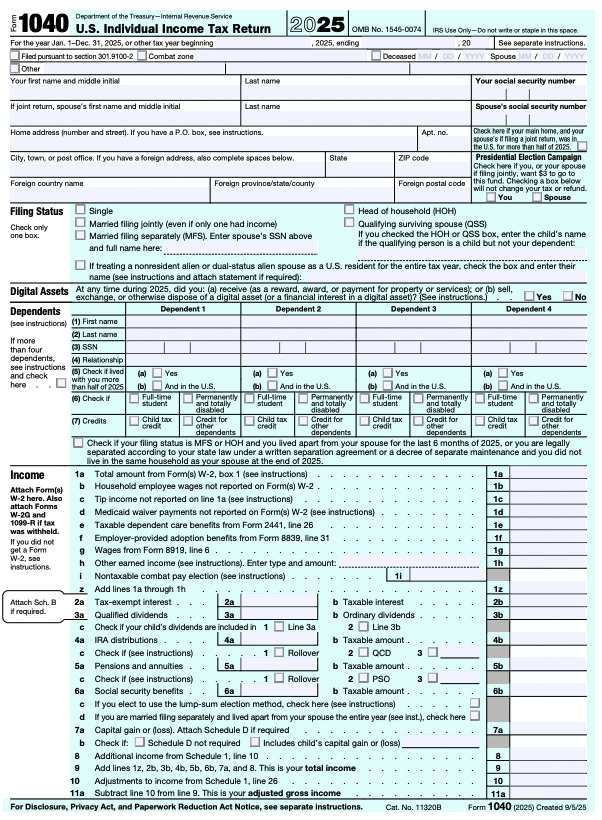

- Your personal information: The top section gathers details like your name, Social Security number (SSN) or individual taxpayer identification number (ITIN), and filing status. If you’re married or have qualifying dependents, their information goes here too. You can check boxes for each dependent indicating their eligibility for the Child Tax Credit or the Credit for Other Dependents.
- Income: Here, you’ll report wages, distributions, ordinary dividends, capital gains, and other income to calculate your total income and adjusted gross income (AGI). Deductions such as the standard or itemized deduction (line 12) and Schedule 1-A additional deductions (line 13b) are applied later to arrive at your taxable income.
- Tax and Credits: This part accounts for all the tax credits you qualify to claim, such as the Child Tax Credit. It then calculates your total tax liability for the year (line 24).
- Payments and Refundable Credits: This section accounts for tax payments you already made, such as withholding from your regular paychecks or estimated tax payments. It also accounts for refundable credits like the Earned Income Credit or Additional Child Tax Credit. Line 33 shows your total payments for the year.
- Refund or Amount You Owe: The final sections will tell you if you’re getting a tax refund or need to make an additional tax payment. If line 33 is greater than line 24, line 34 shows your overpayment (refund). If line 24 is greater than line 33, line 37 shows the amount you owe.
Overview of key schedules for Form 1040
Sometimes, Form 1040 is just the start. Depending on your situation, you may need to file additional schedules along with it to fully report your income or credits.
Schedule 1-A: Additional Deductions
Schedule 1-A (Form 1040) is a new schedule starting with the 2025 tax year. It’s used to report certain additional deductions that reduce your taxable income, even if you take the standard deduction. These deductions have their own new schedule because while they reduce your taxable income, they don’t reduce your AGI like a typical above-the-line deduction.
Here’s a look at the first page of Schedule 1-A:
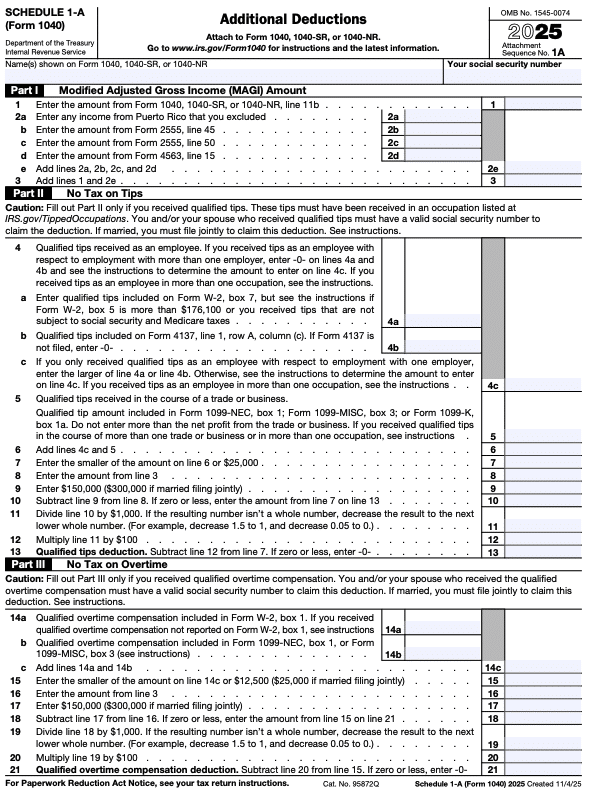
Some reasons for filing Schedule 1-A include qualifying for any of the following deductions during the tax year:
- Qualified tip income deduction
- Qualified overtime pay deduction
- Interest paid on a qualified new vehicle loan
- Additional deduction for taxpayers age 65 or older
Once completed, the total from Schedule 1-A flows to your Form 1040 and lowers the amount of income subject to federal income tax. You don’t need to worry about the specifics, though — TaxAct® will handle all of this for you if you e-file with us.
Schedule 1: Additional Income and Adjustments to Income
Page 1 of Schedule 1 reports additional income and looks like this:
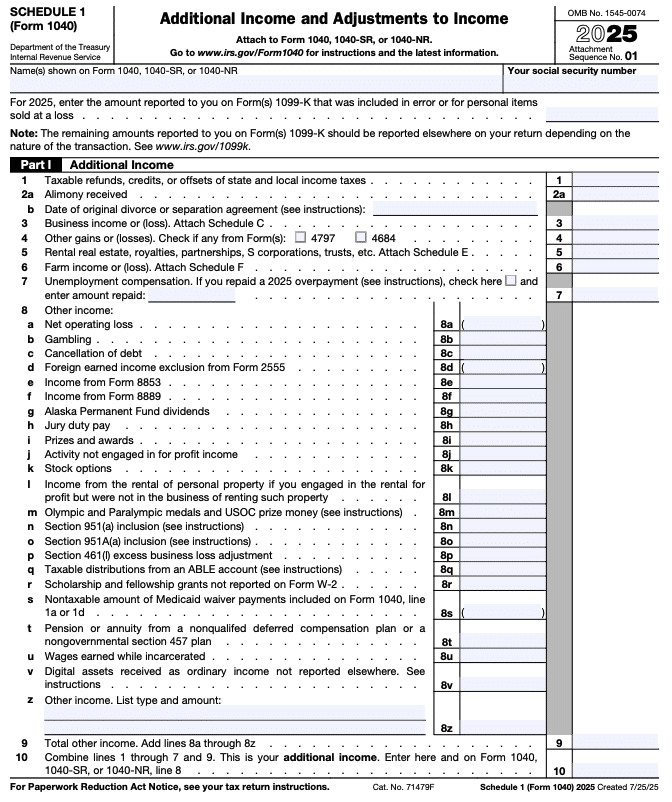
Some reasons for filing Schedule 1 include having any of the following income types during the tax year:
- Unemployment compensation
- Alimony received (pre-2019 divorce or separation agreements only)
- Business income or loss (you may also need Schedule C, Profit or Loss From Business)
- Rental income or loss (you may also need Schedule E, Supplemental Income and Loss)
- Farm income
- Gambling winnings
- Canceled debts
- Prizes and awards
Page 2 of Schedule 1 covers adjustments to income and looks like this:
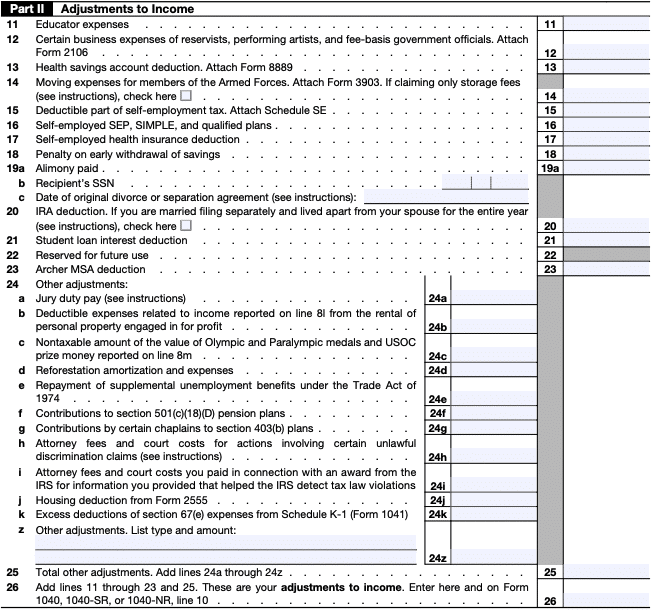
Here, you can report income adjustments like the following:
- Student loan interest deduction
- Deductible educator expenses
- Deductions for retirement contributions
- Health savings account (HSA) deductions
- Self-employment health insurance deduction
Schedule 2: Additional Taxes
Schedule 2 reports additional taxes and looks like this:
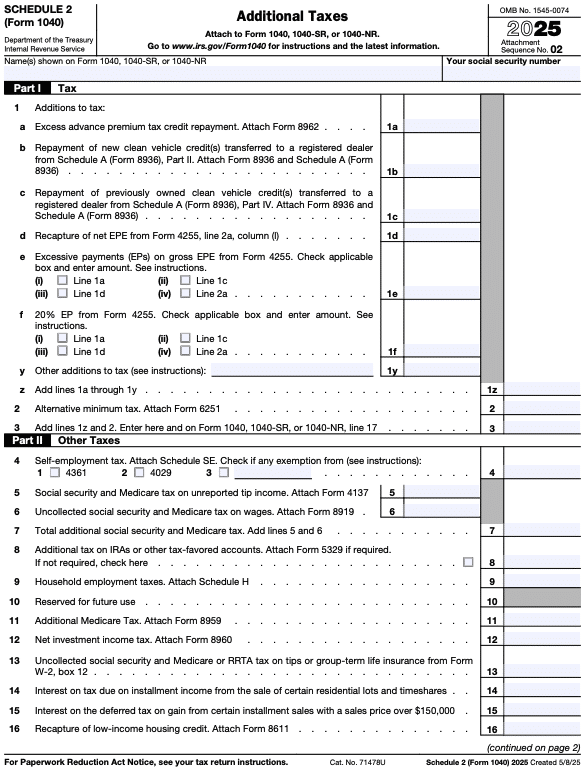
Some reasons for filing Schedule 2 include having any of the following during the tax year:
- Alternative minimum tax (AMT)
- Excess advance premium tax credit repayment
- Self-employment tax
- Additional Medicare Tax, and certain uncollected Social Security and Medicare taxes
- Additional taxes on IRAs and other tax-favored accounts
- Household employment taxes (you may also need Schedule H, Household Employment Taxes)
- Repayment of first-time home buyer credit
- Recapture of low-income housing credit
Schedule 3: Additional Credits and Payments
Schedule 3 reports additional tax credits and payments. Part I covers nonrefundable credits; Part II covers refundable credits and other payments. Here’s what it looks like:
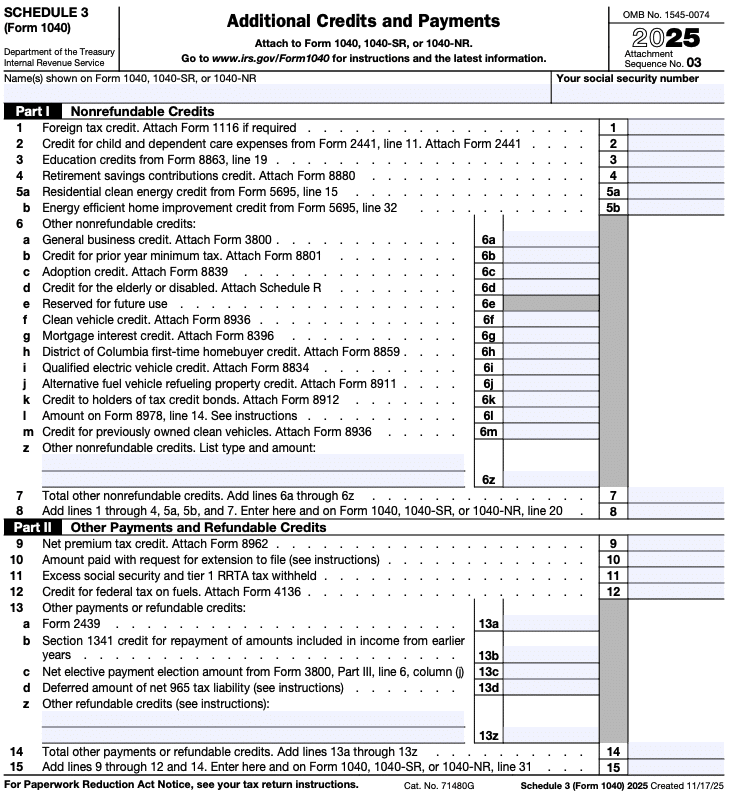
Nonrefundable credits in Part I include:
- Foreign tax credit
- Child and dependent care expenses
- Education credits (such as the American Opportunity Credit or Lifetime Learning Credit)
- As of 2025, up to $5,000 per qualifying child may be refundable. Any remaining allowable portion is nonrefundable and may be carried forward for up to five years.
- Residential energy credits (2025 is the last year you can claim many of these for new expenditures or property placed in service; unused residential clean energy credit may be carried forward to 2026)
- Clean vehicle credit (generally only for vehicles acquired on or before Sept. 30, 2025)
- Mortgage interest credit
- General business credit
- Credit for the elderly or disabled
Part II may include amounts such as the net premium tax credit, excess Social Security tax withheld, and certain other refundable credits reported on Schedule 3.
Form 1040 instructions
Filling out Form 1040 and its schedules isn’t as complicated as it may seem, especially if you use tax software like TaxAct. We walk you through the filing process, including filling out Form 1040 and any accompanying schedules, based on the information you provide.
Here’s how to get started:
- Gather documents: Before filing, collect all necessary tax documents like your W-2s, 1099s, and any statements for IRAs, pensions, or other retirement plans. You’ll also need any information about tax deductions and additional forms related to your tax situation. Use our Form 1040 tax preparation checklist to help you with this!
- Fill out your personal information: Start with your name, address, and SSN. Don’t forget your filing status and dependent information.
- Report your income: Report all types of income. This could include wages, self-employment income, unemployment compensation, or Social Security benefits. If you have additional income or adjustments, you’ll also use Schedule 1 (more on schedules in the next section).
- Claim tax deductions and credits: Claim any tax deductions and credits that apply to you. When you file with us at TaxAct, we ask you questions to determine which deductions and credits may apply to your situation and might help you save on your tax bill. Our software can also help you choose between the standard deduction and itemized deductions (using Schedule A). If you qualify for tips, overtime, car loan interest, or the enhanced senior deduction, you may also need Schedule 1-A.
- Pay your bill or get a refund: TaxAct will calculate your total tax liability based on all the information you provided. We’ll help you fill out your direct deposit information if you qualify for a tax refund. If you owe a tax bill, we can help you pay it or even set up a payment plan if necessary.
Other types of 1040 tax forms
There are multiple versions of the 1040 form, each designed to address specific taxpayer situations. Here’s a deeper look at some of these and how they differ from the standard Form 1040:
1040-SR
This form is designed for taxpayers age 65 and older. If you’re in this age range, you have the option of using either Form 1040 or Form 1040-SR. This form features the same information in Form 1040, but with larger print, which may make it easier to read for some individuals. It also includes a chart showing the additional standard deduction amounts available to taxpayers age 65 or older or blind. This is separate from the enhanced senior deduction on Schedule 1-A.
1040-ES
This form is used to make estimated tax payments throughout the year, typically by individuals with income not subject to withholding, such as self-employment income, rental income, or investment income. Unlike the regular Form 1040, which is filed annually, Form 1040-ES involves making quarterly payments to ensure you stay current with your tax liability and avoid underpayment penalties. This form helps you calculate and pay your estimated taxes on time. The tax year 2026 version of Form 1040-ES is currently available.
Tax Tip: If you e-file your tax return with us, TaxAct can help you set up automatic estimated tax payments via Electronic Funds Withdrawal.
1040-V
The 1040-V form is a payment voucher used when you owe taxes and submit a check or money order to the IRS by mail. It differs from Form 1040 in that it is not a tax return but a way to accompany your payment when filing a paper return. Using Form 1040-V helps ensure that your payment is correctly applied to your tax account.
1040-X
This form is called an amended tax return. If you realize you’ve made a mistake on your Form 1040 or need to make changes, such as correcting your income, deductions, or credits, Form 1040-X allows you to do that. Unlike an original Form 1040, Form 1040-X is filed after the original return to correct or change information on that return.
1040-NR
Form 1040-NR is used specifically by nonresident aliens who are not U.S. residents but have U.S.-sourced income, such as wages or investment returns. You may also need to use this form if you are a representative of certain trusts or estates or of a deceased person who would have needed to file Form 1040-NR.
FAQs about Form 1040
How to file Form 1040 with TaxAct
TaxAct makes tax filing easy. Here’s how to get started:
- Sign up or log in: Head to TaxAct.com and create an account.
- Enter information: Follow the guided prompts to input your personal and income information. If you filed with us last year, we’ll pull information from last year’s return to save you even more time.
- Review and file: TaxAct will double-check your return for errors and guide you through the e-file process. We’ll submit everything to the IRS for you when you’re done.
The bottom line
Form 1040 is often seen as the most important tax form but completing it doesn’t have to be stressful. With the right documents plus some guidance and assistance from TaxAct, you can complete Form 1040 with confidence and be well prepared to file accurately and receive any refund for which you qualify.
This article is for informational purposes only and not legal or financial advice.
All TaxAct offers, products and services are subject to applicable terms and conditions.
Citations
Internal Revenue Service. “About Schedule A (Form 1040), Itemized Deductions.” IRS.gov, 30 Mar. 2026.
Internal Revenue Service. “About Schedule C (Form 1040), Profit or Loss from Business (Sole Proprietorship).” IRS.gov, 28 June 2026.
Internal Revenue Service. “About Schedule E (Form 1040), Supplemental Income and Loss.” IRS.gov, 30 Mar. 2026.
Internal Revenue Service. Form 1040-ES, Estimated Tax for Individuals, 2026. IRS.gov. Accessed 28 Sept. 2026.
Internal Revenue Service. Schedule 1-A (Form 1040), Additional Deductions, 2025. IRS.gov. Accessed 28 Sept. 2026.