


Updated for tax year 2025.
Did you sell any stocks or other investments during the tax year? If so, prepare to receive Form 1099-B. Here’s what you need to know about this important tax document.
At a glance:
- Brokerages send Form 1099-B to taxpayers who sold investments like stocks or bonds. The IRS also gets a copy of this form.
- 1099-B details your capital gains and losses from each transaction, which are reported on Schedule D when you file your taxes.
What is IRS Form 1099-B?
The Internal Revenue Service (IRS) requires brokerages and other financial institutions to send out Form 1099-B, Proceeds from Broker and Barter Exchange Transactions, during tax season. Form 1099-B is an information return, which just means it’s a tax document that reports certain types of transactions you made during the year — in this case, investment transactions. Both you and the IRS get a copy.
Who receives Form 1099-B?
You’ll receive this tax form if you sold stocks, bonds, mutual funds, or other investments in your account. Your 1099-B is an informational document that details which securities were sold, as well as your capital gains and losses.
For more information on investment taxes, check out Taxes on Investments: What Investors Need to Know.
Who issues Form 1099-B?
You don’t need to request Form 1099-B. A brokerage or financial institution issues this form when you sell certain investments during the tax year.
Examples of 1099-B issuers include:
- Online brokerages where you trade stocks, ETFs, or options
- Mutual fund companies
- Investment platforms that handle bonds or other securities
- Barter exchanges (less common, but still covered by the form)
If you sold investments through more than one account, expect more than one 1099-B. Each issuer reports only transactions that occurred on its platform.
The deadline for brokers to send Form 1099-B is Feb. 15, or the next business day, if that day falls on a weekend or holiday (in 2026, the deadline is Feb. 17). So, you should receive year-end statements from each brokerage or other financial institution by the end of February.
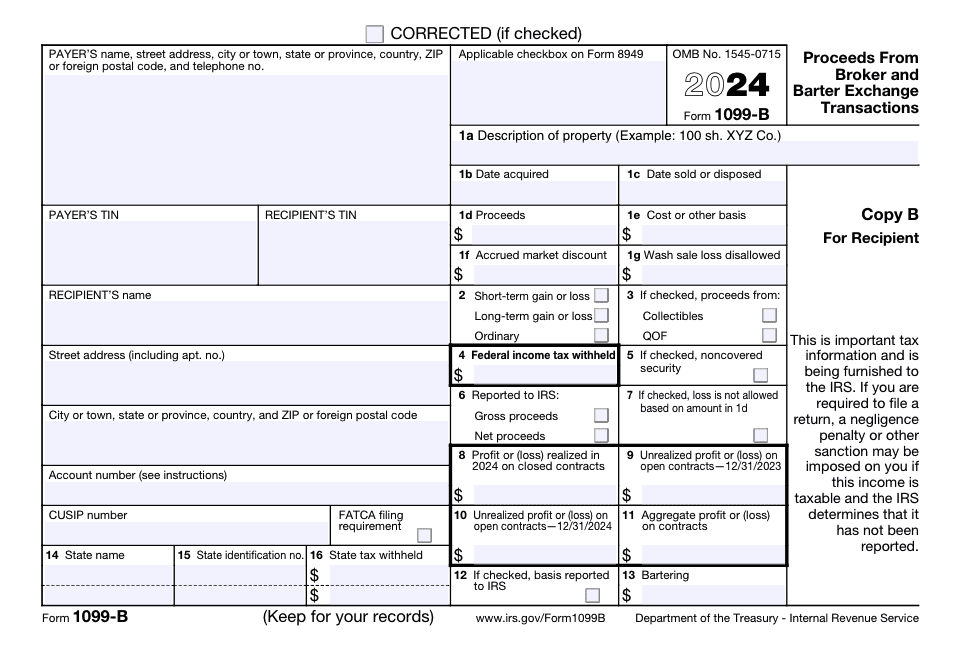
Example of Form 1099-B
Here’s a visual example of Form 1099-B to help you understand the layout and information reported on this tax form:
How to read a 1099-B
Form 1099-B reports broker transactions involving capital assets and other securities. Each box provides specific tax information you’ll use when filing your income tax return. Here’s a breakdown:
- Box 1a: Description of property. This is the “what” of your transaction — the name of the stock, bond, or other security you sold.
- Box 1b: Date acquired. Here, you’ll see the date you originally acquired the property.
- Box 1c: Date sold or disposed. This box shows when you sold your investment.
- Box 1d: Proceeds. This box shows the gross proceeds from the sale.
- Box 1e: Cost or other basis. This tells you what you originally paid for the property (plus any applicable expenses). If it’s blank, you may need to compare it against your own records to determine your basis. Subtract this number from your proceeds in Box 1d to figure out the taxable amount.
- Box 1f: Accrued market discount. If you sold certain debt instruments, this box may show accrued market discount that could be taxed as ordinary income.
- Box 1g: Wash sale loss disallowed. This box shows any loss the IRS doesn’t allow due to wash sale rules, which apply when you sell and repurchase the same or similar securities within a short timeframe.
- Box 2: Type of gain or loss. This box helps you understand how your gain will be taxed, depending on whether it’s a short-term or long-term gain. If “ordinary” is checked, your security might be subject to special rules.
- Box 3: If checked, proceeds from collectibles or a QOF. This checkbox shows whether the sale involved collectibles or a qualified opportunity fund (QOF). These transactions may be subject to special tax rules and can affect how the gain or loss is reported.
- Box 4: Federal income tax withheld. If any federal income tax was withheld from the transaction, it appears here. This can happen in certain backup withholding situations.
- Box 5: Noncovered security. If this box is checked, box 2 might be blank. A “noncovered security” just means the broker is not required to report certain information.
- Box 6: Reported to IRS. Gross proceeds or Net proceeds. This checkbox shows whether the reported proceeds reflect gross proceeds or net proceeds after adjustments.
- Box 7: Check if loss is not allowed based on amount in 1d. This box is used in limited cases where losses are restricted based on how proceeds are calculated.
- Box 8: Gain or loss amount. Some broker transactions, including certain forward contracts or regulated futures contracts, may report gains or losses directly in this box.
- Boxes 8-11: Contract-related gains or losses. These boxes apply to more complex broker transactions, such as regulated futures contracts, securities futures contracts, forward contracts, and foreign currency contracts.
- Rather than listing each trade separately, brokers may report gains or losses in the aggregate, including realized and unrealized amounts, as well as profit and loss from open contracts at year-end. Most everyday filers won’t see amounts here unless they’re trading specialized contracts.
- Box 12: If checked, basis reported to IRS. This checkbox shows whether your broker reported your cost basis to the IRS. When this box is checked, it’s important that the numbers you report match the numbers provided to the IRS.
- Box 13: Bartering. This box applies to barter exchange transactions and reflects non-cash proceeds reported to the IRS.
- Box 16: State tax withheld. If state tax was withheld, it appears here.
If some of the boxes on Form 1099-B sound confusing, don’t stress. TaxAct® can help walk you through the form if you e-file with us.
Form 1099-B instructions
If you sold any stocks, options, commodities, or other securities, your 1099-B form will detail your profits and losses from those transactions.
On Form 1099-B, you’ll find:
- A description of each investment sold
- The purchase date and cost basis (how much you paid for the investment)
- The sale date and sales price
- Your resulting gain or loss
- If taxes were withheld
Gains and losses
The information on Form 1099-B helps you determine your net capital gain or loss for each transaction. Any capital losses can offset your capital gains up to a certain amount. Your purchase and sale dates are important because they determine whether you have a long-term capital gain or a short-term capital gain. Long-term gains have their own tax rates, while short-term gains are simply taxed as ordinary income.
To help you determine your taxable income from capital gains, try out our capital gains tax calculator.
Different types of transactions
Form 1099-B covers various types of transactions, including:
- Sales of stocks
- Sales of bonds
- Redemptions of mutual funds
- Other securities transactions
FAQs about Form 1099-B
How to report Form 1099-B on your tax return with TaxAct
If you received a 1099-B, you’ll need to file Schedule D with your federal tax return. Schedule D reports your capital gains and losses for the tax year. When you e-file with us at TaxAct, we’ll ask you detailed interview questions about your capital gains and losses to help you accurately report the transactions from your 1099-B on Schedule D.
Do I file Form 1099-B with my tax return?
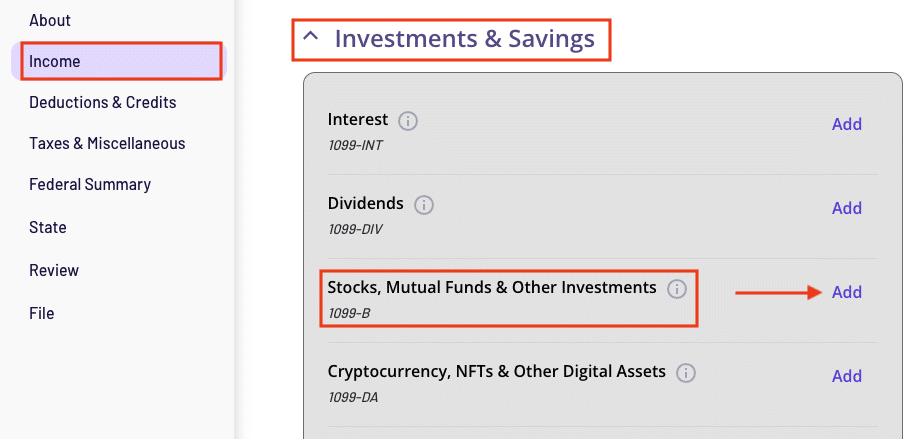
You don’t need to attach Form 1099-B to your return, but you will need to report your 1099-B transactions. To enter your Form 1099-B information in TaxAct, follow these steps and reference our TaxAct product screenshot if needed:
- From within your TaxAct return, click Income. On smaller devices, click the menu at the top left corner of your screen, then make your selection.
- Click the Investments & Savings drop-down.
- Click Add beside Stocks, Mutual Funds & Other Investments as shown in the screenshot below.
- Enter the form manually or search for a bank or financial provider, then complete the rest of the interview process.
Noncovered securities
If you have received a Form 1099-B with box 5 checked, do the following when e-filing with TaxAct:
- From within your Form 1099-B, continue with the interview process until the software asks for your transaction details.
- Under Term and Type, click the Term and Type drop-down, then click “B-Short-term transaction in which basis was NOT reported to the IRS” or “E-Long-term transaction in which basis was NOT reported to the IRS.”
The bottom line
Form 1099-B provides detailed information on your capital gains and losses, which are essential for completing your tax return. Take the stress out of reporting your 1099-B gains and losses by using a tool like TaxAct, which can help you input your transactions step by step. Managing your 1099-B properly not only keeps you on the IRS’s good side but also helps you make the most of any potential tax benefits from your investments. For more information about Form 1099-B, head on over to the IRS website.
This article is for informational purposes only and not legal or financial advice.
All TaxAct offers, products and services are subject to applicable terms and conditions.
All trademarks not owned by TaxAct LLC that appear on this website are the property of their respective owners, who are not affiliated with, connected to, or sponsored by or of TaxAct, Inc.