


You might receive Form 1099-S this year if you sold a house, some land, or another piece of property. But what does this form mean for your income tax return? Don’t worry; we’ll walk you through everything you need to know about this form, why you got it, and how to easily report it on your tax return.
At a glance:
- Form 1099-S reports real estate transactions, which you must report on your tax return.
- The person or entity responsible for closing the sale fills out and sends Form 1099-S.
- Selling property doesn’t automatically mean you owe taxes, as you may qualify for an exclusion.
What is Form 1099-S?
Form 1099-S, Proceeds from Real Estate Transactions, reports the sale or exchange of real estate property to the Internal Revenue Service (IRS). This could include any of the following:
- Your main home or another residential building
- Developed or undeveloped land (including air space)
- Condominium units (including any fixtures or land)
- Commercial or industrial buildings
- Shares in a cooperative housing corporation
- Non-contingent interest in standing timber
Who sends Form 1099-S?
Depending on the specific transaction circumstances, different parties may be responsible for sending Form 1099-S. According to IRS instructions, the person responsible for closing the transaction should be the one to fill out the form. Often, this falls on the title company, escrow company, or mortgage lender who helped you close the transaction.
However, just because you sold a piece of property doesn’t automatically mean you owe taxes. Whether you’re on the hook depends on factors like the type of property, any exclusions you qualify for, and your overall capital gains.
IRS Form 1099-S example
Form 1099-S looks like this:
On the left side of the form, you’ll find two types of contact information:
- The filer: This is the closing agent or entity that sent you the form. You’ll see their name, address, and taxpayer identification number (TIN).
- The transferor: As the seller, you are also known as the transferor. You’ll see your own contact information, account number, and TIN (often your Social Security number or SSN).
Here’s what the boxes on the right mean:
- Box 1: Date of closing – The date when the real estate transaction was finalized.
- Box 2a: Total gross proceeds – The total gross proceeds from the sale, which is generally the contract sales price. This is typically the sum of Boxes 2b and 2c (cash and digital asset proceeds combined). Keep in mind that this is gross proceeds, not your taxable gain.
- Box 2b: Total cash gross proceeds – This box shows the cash proceeds from the sale, including cash received through a digital-asset payment processor. It does not include the value of digital assets (Box 2c) or other property or services received as consideration.
- Box 2c: Digital asset gross proceeds – This box is for gross proceeds from a real estate transaction you received, or will receive, in the form of digital assets measured in U.S. dollars.
- Box 3: Address or legal description – The property sold or transferred.
- Box 4: Buyer’s part of real estate tax – This box shows the remaining real estate tax to be paid by the buyer for the tax year. For instance, say you paid your real estate taxes for the rest of the year in advance but sold your main home at the end of October. The buyer would then be responsible for the final two months of tax payments, indicated in this box.
- Box 5: This box is currently blank and reserved for future use.
- Box 6: If checked, the transferor received or will receive services or property (other than cash, notes, or digital assets) as part of the consideration.
- Box 7: If checked, the transferor is a foreign person (nonresident alien, foreign partnership, foreign estate, or foreign trust).
- Box 8a: Code for digital asset received, or to be received, as consideration. The nine-character digital token identifier code from the Digital Token Identifier Foundation (DTIF).
- Box 8b: Name of digital asset received, or to be received, as consideration
- Box 8c: Number of digital asset units received, or to be received, as consideration
- Box 8d: Date digital asset received, or to be received, as consideration
Instructions for Form 1099-S
Once you have your Form 1099-S, follow these steps to ensure you report it correctly:
- Determine if the transaction is reportable: First, find out if your real estate sale qualifies for any exclusions, like the home sale exclusion. TaxAct® can help you determine whether you have a reportable transaction by asking questions about the sale.
- Report the sale: Report the transaction on Form 8949 and Schedule D (or the appropriate business/rental forms), using your 1099-S amounts, basis, and any exclusions you qualify for. TaxAct can simplify this process by filling out the necessary tax forms for you step by step.
- Check for state-specific requirements: Some states have their own tax forms you need to file, so check with your state’s tax agency. TaxAct can also pull information from your federal income tax return to help streamline the e-filing of your state income tax return.
What if you sold property for cryptocurrency?
Starting in tax year 2026, Form 1099-S must report when digital assets are used in the sale or exchange of real estate. That includes sales where the buyer pays with cryptocurrency, stablecoins, or other digital assets, not only traditional cash or wire transfers. According to the IRS, a digital asset is a digital representation of value recorded on a cryptographically secured distributed ledger, such as a blockchain, that is not cash.
Examples of digital assets can include:
- Convertible virtual currencies and cryptocurrencies (like Bitcoin)
- Stablecoins
- Non-fungible tokens (NFTs)
How do you report this on your tax return?
You can treat the sale like any other real estate transaction for tax purposes:
- Use the amounts from Form 1099-S (including Boxes 2a–2c and any digital asset details in Boxes 8a–8d) as your starting point for gross proceeds.
- Determine your adjusted basis and allowable selling costs.
- Report the sale on Form 8949 and Schedule D (or the appropriate business/rental forms if the property was not for personal use).
- If the property was your main home, you may still qualify for the Section 121 exclusion (up to $250,000 or $500,000 if married filing jointly) if you meet ownership and use tests, even when part of the consideration was paid in digital assets.
Receiving digital asset proceeds does not by itself mean you owe tax on the full amount shown in Box 2c. It means the IRS has been notified that part of the consideration was digital, and you must report the transaction correctly.
IRS Form 1099-S FAQs
How to file Form 1099-S with TaxAct
You can report your real estate proceeds in TaxAct using various methods depending on the type of property you sold.
Sale of your main home:
Sale of your main home:
- From within your TaxAct return (Online or Desktop), click Federal (on smaller devices, click in the top left corner of your screen, then click Federal).
- Click the Investment Income dropdown, click the Gain or loss on the sale of investments dropdown, then click Sale of your main home.

3. Continue with the interview process to enter your information.
Sale of a timeshare, vacation home, or investment property:
A timeshare or vacation home is considered a personal capital asset and should be reported on Schedule D for Capital Gains or Losses. If you profit from selling it, you must report it as income. However, if you experience a loss from the sale, the IRS does not allow you to deduct that loss.
If you inherited investment property, your basis is generally the property’s fair market value on the date of death (or alternate valuation date, if applicable), not necessarily the sale price. Report the sale on Schedule D using your correct basis. If you sold inherited property at a loss, whether the loss is deductible depends on how the property was used; personal-use property losses generally aren’t deductible.
To report the sale of your vacation home, timeshare, or investment property in TaxAct:
- From within your TaxAct return (Online or Desktop), click Federal (on smaller devices, click in the top left corner of your screen, then click Federal).
- Click the Investment Income dropdown, click the Gain or loss on the sale of investments dropdown, then click Capital gain or loss (Form 1099-B).
3.Click + Add Form 1099-B to create a new copy of the form or click Edit to edit a form already created (desktop program: click Review instead of Edit).
4. Continue with the interview process to enter your information.
Sale of business property (reportable on Form 4797 and Schedule D):
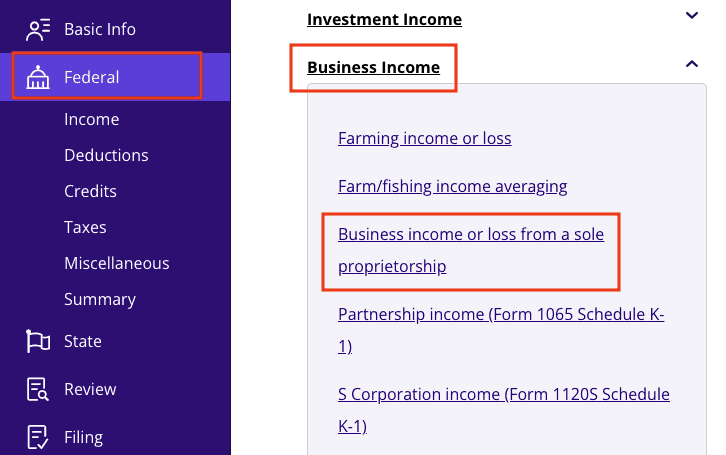
- From within your TaxAct return (Online or Desktop), click Federal (on smaller devices, click in the top left corner of your screen, then click Federal).
- Click the Business Income dropdown, then click Business income or loss from a sole proprietorship (or Farming income or loss, if applicable).
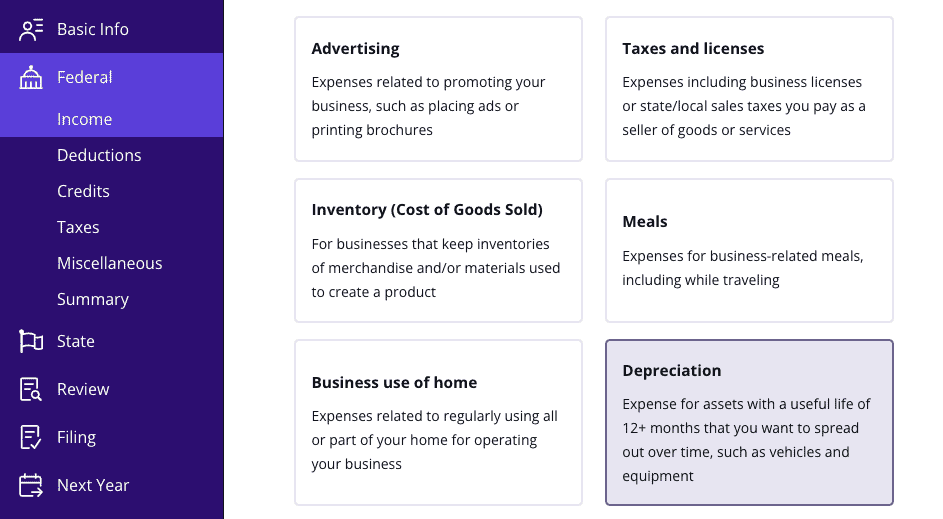
3. Continue with the interview process until you reach the screen titled Here are some of the most commonly used expenses. Select Depreciation from the list as shown below.
4. On the page titled Business Income – Depreciation, click Yes to the question shown below.
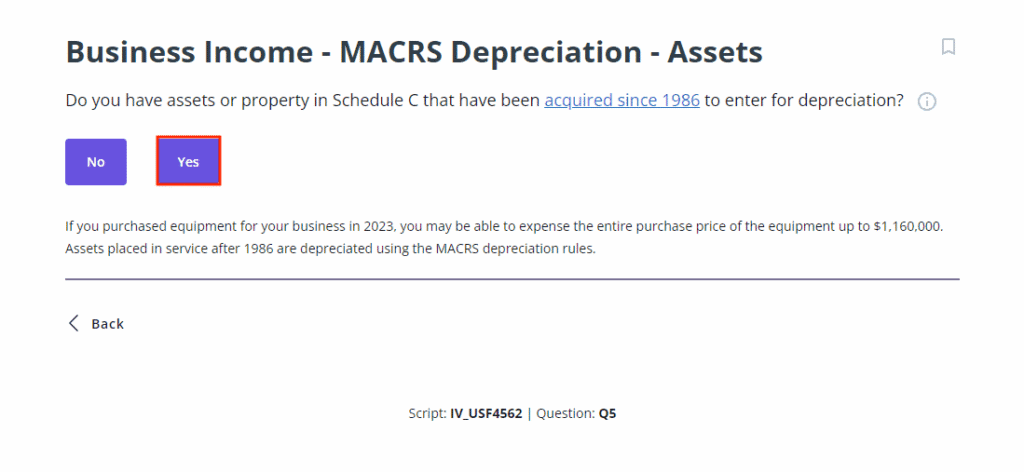
5. On the screen titled Business (or Farm) Income – MACRS Depreciation – Assets, click Yes as shown below.
6. Click Step-by-Step Guidance and continue with the interview process to enter your information.
Sale of business property (if the property never depreciated):
- Follow the steps for reporting the sale of business property in the previous section. After entering any depreciation and expenses, you’ll come to the screen shown below. Click Yes.
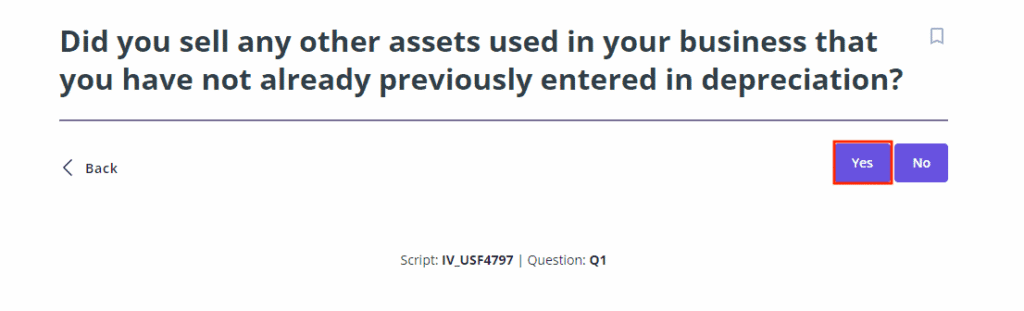
2. Continue with the interview process to enter information for the asset that you sold.
Sale of rental property (reportable on Form 4797 and Schedule D):
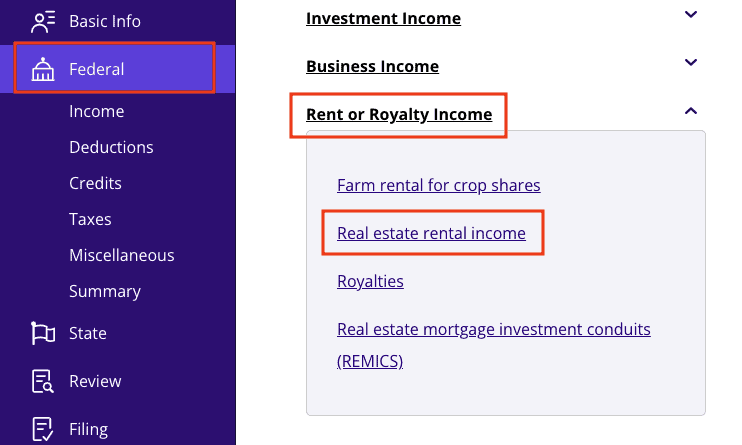
- From within your TaxAct return (Online or Desktop), click Federal (on smaller devices, click in the top left corner of your screen, then click Federal).
- Click the Rent or Royalty Income dropdown, then click Real estate rental income.
3.Click + Add Schedule E, Pg 1 to create a new copy of the form or click Edit to edit a form already created (desktop program: click Review instead of Edit).
4. Continue with the interview process until you reach the screen titled Rental Income – Depreciation as shown below, then click Yes.
5. On the screen titled Rental Income – MACRS Depreciation – Assets as shown below, click Yes.
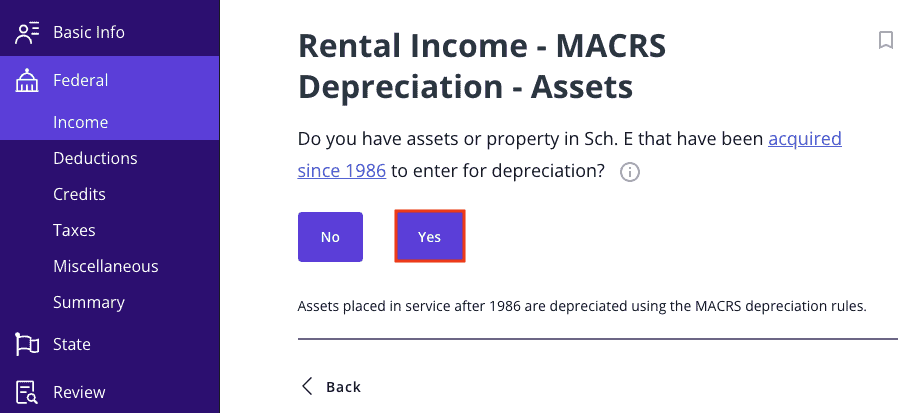
6. Click Step-by-Step Guidance, and continue with the interview process to enter your information.
The bottom line
Form 1099-S doesn’t have to be intimidating. Whether it’s your first time filing or you’re a seasoned DIY tax filer, knowing what this form means and how to report it can save you stress and headaches during tax filing season. And as always, when you file with TaxAct, you can rest assured we’ve got the tools you need to tackle your 1099 forms without breaking a sweat.
This article is for informational purposes only and not legal or financial advice.
All TaxAct offers, products and services are subject to applicable terms and conditions.
Citations
Internal Revenue Service. “Digital Assets.” IRS, 3 Apr. 2026, www.irs.gov/filing/digital-assets.
Internal Revenue Service. Form 1099-S, Proceeds from Real Estate Transactions (Rev. December 2026). IRS, www.irs.gov/pub/irs-pdf/f1099s.pdf. Accessed 17 Sept. 2026.
Internal Revenue Service. Form 8949, Sales and Other Dispositions of Capital Assets (2025). IRS, www.irs.gov/pub/irs-pdf/f8949.pdf. Accessed 17 Sept. 2026.
Internal Revenue Service. Instructions for Form 1099-S (12/2026). IRS, www.irs.gov/instructions/i1099s#en_US_202201_publink1000280427. Accessed 17 Sept. 2026.
Internal Revenue Service. Schedule D (Form 1040), Capital Gains and Losses (2025). IRS, www.irs.gov/pub/irs-pdf/f1040sd.pdf. Accessed 17 Sept. 2026.