


Did you receive Form 1099-INT this tax year? Here’s what is included in this important tax document and how you should use it when filing your federal income tax return.
At a glance:
- Form 1099-INT reports any interest income you earned.
- You’ll receive this form if you earn at least $10 in interest during the tax year.
- Most interest is taxable and should be reported as ordinary income on your federal tax return.
What is Form 1099-INT from the IRS?
If you received Form 1099-INT from a financial institution during tax season, it means you had interest income during the tax year. Payers send copies of Form 1099-INT to you and the Internal Revenue Service (IRS), so it’s important you report your interest income on your tax return.
Interest income can come from various sources, such as savings accounts at your bank or credit union, certificates of deposit (CDs), Treasury bills, and other interest-bearing accounts. The IRS requires institutions to report this income if it exceeds $10 during the year.
Example of Form 1099-INT
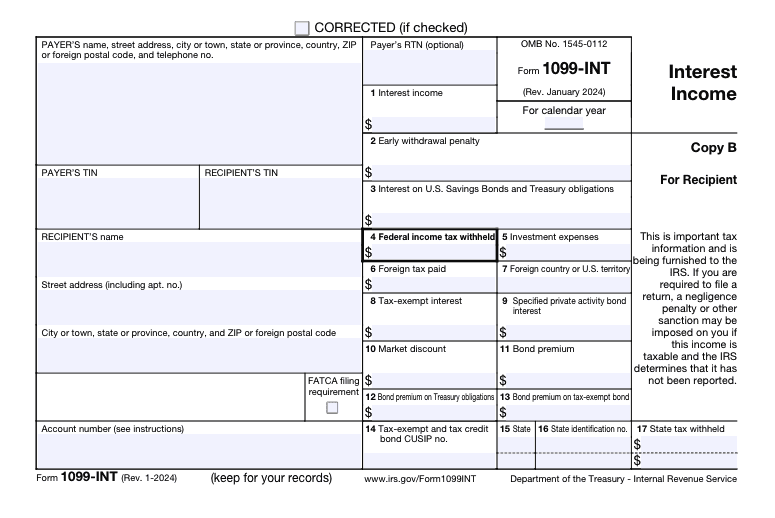
Here is an example of what Form 1099-INT looks like and the information that’s included on the tax form:
Form 1099-INT instructions
What information is on IRS Form 1099-INT?
Form 1099-INT includes several key pieces of information for taxpayers:
- Payer’s information: The name, address, and taxpayer identification number (TIN) of the issuer paying the interest.
- Recipient’s information: Your name, address, and Social Security number (SSN) or TIN will also be included on the tax form.
- Interest income: In box 1, you’ll find the amount of taxable interest income you earned over $10, which is the primary figure you’ll need to report on your tax return. This box can also include interest of $600 or more earned in the course of a trade or business.
- Early withdrawal penalties: Box 2 reports any principal or interest forfeited due to early withdrawal of funds, if applicable. This amount can be deducted from your gross income.
- Interest on U.S. Savings Bonds and Treasury obligations: In box 3 you’ll find the amount of interest earned from U.S. Savings Bonds, as well as Treasury bills, notes, and bonds issued by the federal government. This interest isn’t included in the amount in box 1.
- Federal income tax withheld: Box 4 shows any federal income tax that was withheld from your interest income. This can happen if you don’t provide the payer with your TIN.
- Investment expenses: Box 5 shows certain fees or expenses related to the investment.
- Foreign tax paid: Box 6 reports any foreign tax paid on the interest income.
- Tax-exempt interest: Box 8 shows interest income that is exempt from federal income tax, such as municipal bond interest.
If you have any info in boxes 9 to 17, it’s typically for a very specific purpose. Not to worry — TaxAct® will help you report your interest income correctly when you file using our tax preparation software.
When you receive a 1099-INT, you’ll use the information it provides to complete your tax return. Here’s a step-by-step guide:
- Gather your forms: Collect all the 1099-INT forms you’ve received from various financial institutions. You may receive more than one if you have multiple interest-earning accounts.
- Review the information: Ensure that all the details on the form are correct. If you spot any errors, make sure to contact the issuer for a corrected form.
- Include interest income on your tax return: TaxAct will walk you through reporting your interest income step-by-step when you e-file with us.
FAQs about Form 1099-INT
How to File Form 1099-INT with TaxAct®
When you e-file using TaxAct’s intuitive tax preparation software, we can help you report Form 1099-INT on your income tax return. We ask you simple questions about your 1099-INT form to ensure you accurately report your interest income to the IRS.
To report Form 1099-INT in the TaxAct program:
- From within your TaxAct return (Online or Desktop), click Federal. (On smaller devices, click in the top left corner of your screen, then click Federal.)
- Click the Investment Income dropdown, then click Interest income (Form 1099-INT).
- Click + Add Form 1099-INT to create a new copy of the form, or click Edit to edit an already-created form. (Desktop program: click Review instead of Edit).
- Continue with the interview process to enter your tax information.
The bottom line
Understanding Form 1099-INT and how to handle it is essential for accurate tax reporting. Knowing what this form means and how to report your interest income can help ensure a smoother tax filing experience and avoid potential issues with the IRS. Always keep detailed records of your interest income and consult with a tax professional if you have any questions or concerns.